Personas in Clavius: Segment AEO Tracking by Audience
Meet Personas: create audience profiles, attach them to prompt packs, run scans, and see Share of Voice, Visibility Score, intent, gaps, and wins—by persona.

AI answers aren’t one-size-fits-all. The queries a CMO asks are different from a CTO or function lead and the sources those answers cite can change dramatically based on intent, role, and context.
Personas in Clavius let you group prompts around a specific audience, then track performance and opportunities. You can see what each audience is actually being shown and what you may need to fix to earn more citations in Answer Engines like ChatGPT.
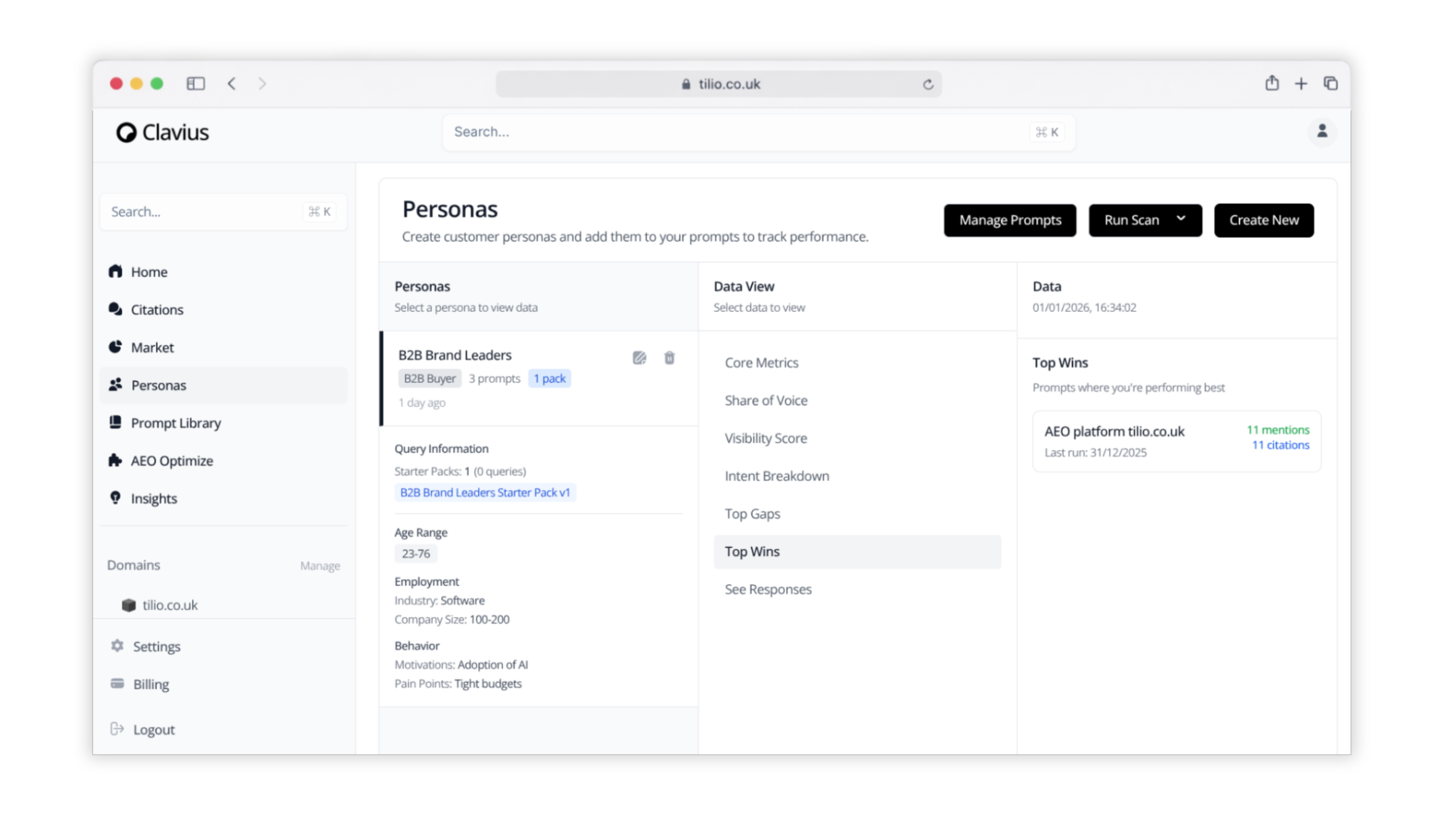
What Personas are in Clavius
A Persona is a saved audience profile you can attach to your prompts (or prompt packs) to track and compare performance across different target segments.
Each Persona can include practical context such as:
- Role / buyer type (e.g., B2B buyer, brand leader, marketing lead)
- Age range (optional demographic framing)
- Industry and company size (e.g., Software, 100–200 employees)
- Motivations (e.g., adoption of AI)
- Pain points (e.g., tight budgets)
- Starter packs and attached prompt sets (so you can launch tracking fast and stay consistent)
The result: one place to standardize how you monitor AI visibility for the audiences you actually sell to.
How Personas help your AEO strategy
Personas turn “Are we showing up?” into “Are we showing up for the right buyers—at the right stage—on the right prompts?”
With Personas, you can:
- Measure visibility by audience (so your ICP isn’t drowned out by irrelevant segments)
- Compare performance across personas to spot where your positioning breaks down
- Prioritize content and structured data fixes based on the personas that drive revenue
- Align teams (Marketing, Product, Sales) on which narratives need to be cited in AI answers
- Prove impact by tying improvements to persona-specific prompt packs and scans
In other words: Personas make AEO measurable in a way your stakeholders can understand—and act on.
What you can do in the Personas dashboard
The Personas experience is built around a simple workflow: define the audience → attach prompts → run scans → analyze outcomes.
Create and manage personas. Build customer personas for each key segment you care about (for example, “B2B Brand Leaders”), then maintain them over time as your positioning and market evolve.
Attach prompts and packs. Personas are designed to be added to your prompts so you can track performance at the persona level—especially useful when you use starter packs or curated prompt sets for consistent monitoring.
Run scans on demand. When you’re ready to measure performance (after a content update, a PR hit, a product launch, or a structured data fix), run a scan and capture a timestamped view of results.
Switch Data Views to answer different questions. From within a Persona, you can jump between key views like:
- Core Metrics (your high-level health check)
- Share of Voice (how present you are vs. others in AI answers for that persona’s prompts)
- Visibility Score (a single signal you can track over time)
- Intent Breakdown (what types of intent your prompts represent, and how you perform in each)
- Top Gaps (where competitors or other sources win and you don’t)
- Top Wins (where you’re performing best)
- See Responses (review what the model answered and what it cited)
Track mentions and citations. Top Wins surfaces prompts where you’re performing best, often summarizing results like mentions and citations. Mentions indicate your brand or domain appears in answers; citations indicate your domain is referenced as a source—typically a stronger signal for defensible visibility.
How to set up a Persona (fast)
Step 1: Create a Persona. Give it a name that matches a real buying audience (role + context works best).
Step 2: Add audience context. Fill in what matters for analysis and internal alignment: buyer type, industry, company size, motivations, and pain points.
Step 3: Attach prompts or a starter pack. Use a prompt pack to keep monitoring consistent. This is how you avoid “random prompt drift” that makes results hard to compare month to month.
Step 4: Run a scan. Capture a baseline. This is your “before” snapshot.
Step 5: Choose a Data View. Start with Core Metrics, then move to Share of Voice, Visibility Score, Intent Breakdown, and finally Gaps/Wins for action.
How to use Personas to find wins, gaps, and next actions
Use Top Wins to protect what’s working. If a persona is already earning strong mentions and citations for a high-intent prompt, treat it like a revenue page: keep it current, reinforce it with internal links, and defend it with clear structured data.
Use Top Gaps to prioritize content that will move the needle. When you see gaps, you’re typically looking at one of these issues:
- Missing “best answer” content (no page that directly and cleanly answers the question)
- Weak entity clarity (AI models can’t confidently connect your brand to the topic)
- Thin proof (no examples, benchmarks, integrations, or use cases to cite)
- Structured data friction (schema issues or missed opportunities)
- Competitor dominance (others have better, more quotable pages for that persona’s intent)
Use See Responses to rewrite for citation. When you review responses, look for patterns in what gets cited:
- Short, concrete definitions
- Step-by-step frameworks
- Clear comparisons and decision criteria
- Specific claims supported by evidence (numbers, examples, screenshots in-product, or named workflows)
Then update the pages that should win—product pages, comparison pages, integration pages, and “how it works” content—so they’re easier for AI to quote and cite.
Best practices: running Personas like a system
Keep personas tied to revenue. Start with 2–4 personas that match your ICP and buying committee. Expand only when you have a clear reason (new vertical, new product line, new region).
Standardize prompt packs. Maintain a stable “baseline” pack per persona and a smaller “experiment” pack for new narratives (features, pricing, category language).
Scan on a cadence. Weekly for fast-moving categories, biweekly or monthly for steady markets. Always scan after major site or messaging changes.
Report with two numbers and one story. Use Visibility Score + Share of Voice as your executive headline, then use Top Gaps/Wins to explain what changed and what you’ll do next.
Turn insights into tickets. Every gap should map to an action: a page to build, a section to rewrite, a schema fix, or a competitive response. Personas make it obvious what to do next—don’t stop at the dashboard.
FAQs
What’s the difference between a persona and a prompt pack? A persona is the audience segment you’re tracking; a prompt pack is the set of queries you monitor for that persona.
Do I need multiple personas? Only if you have meaningfully different audiences or buying roles. Start small and expand once you’re acting on insights consistently.
What should I put in persona fields like motivations and pain points? Use the language your customers use in sales calls, onboarding, and support tickets. This improves internal alignment and helps you interpret gaps correctly.
How often should I run scans? Run scans on a consistent cadence (weekly/biweekly/monthly) and always after major messaging, content, or technical changes.
What should I do when I see a “Top Gap”? Identify whether it’s a content gap, entity clarity gap, proof gap, or structured data issue—then create a specific ticket with an owner and a rescanning date.
What’s a “citation” vs a “mention”? A mention is your brand/domain appearing in the answer; a citation is your domain referenced as a source. Citations are typically a stronger signal of defensible visibility.